1. Fax.Plus
Best overall: freelancers, remote teams, and international faxing
$6.99/mo 200 pages Email-to-Fax: ✓ 10 pages/month, forever
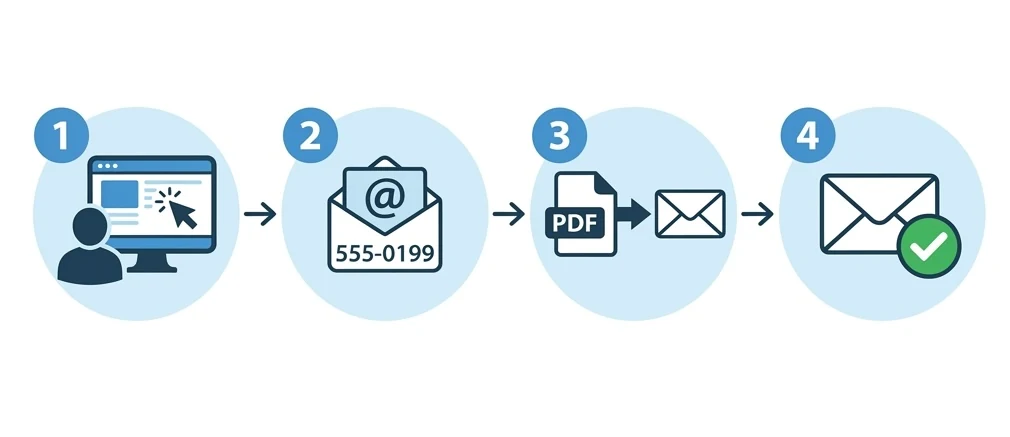
We tested over a dozen email-to-fax providers, and Fax.Plus kept coming out on top. The free tier alone gives you 10 pages a month to 190+ countries: no credit card, no ads. Upgrading to the Basic plan ($6.99/mo) unlocks 200 pages, which covers most freelancers and small businesses. The email-to-fax setup took us about two minutes: you send to [email protected], attach your PDF, and that's it. Delivery confirmations land in your inbox within seconds. Security-wise, Fax.Plus is SOC 2 Type II certified, uses end-to-end encryption (E2E), and is CCPA compliant with data residency options, all backed by Swiss-grade data protection. The Sign.Plus integration means you can e-sign documents before faxing them, saving the print-sign-scan loop entirely. If you use Slack, Zapier, or Google Workspace, there are native integrations too.
Pros
- Permanent free plan (10 pages/month)
- Lowest paid rate at $6.99/mo for 200 pages
- Email-to-fax works from any email client
- 190+ country coverage: best international reach
- Sign.Plus eSignature built in
Cons
- HIPAA compliance with signed BAA only on the Enterprise plan ($79.99/mo annual)
- Free plan pages don't roll over
2. Documo
Healthcare organizations needing EHR integration
$25/mo 300 pages Email-to-Fax: ✓ 14-day free trial
Documo isn't competing with FaxZero or Fax.Plus — it's built for healthcare organizations that need fax deeply integrated into their clinical workflows. The standout feature is direct EHR integration with systems like PointClickCare and ModMed, which means faxes can flow directly into patient records without manual handling. Their AI-powered OCR can auto-extract data from incoming faxes and route them to the right department. Email-to-fax is included on all plans, but most Documo customers use the dashboard or API instead. HIPAA compliance is baked into every plan, no upselling. At $25/month, it's the most expensive option on this list, but for multi-provider clinics handling hundreds of faxes weekly, the automation pays for itself.
Pros
- HIPAA compliant on every plan
- Direct EHR integration (PointClickCare, ModMed)
- AI-powered OCR and auto-routing
- 14-day free trial with full access
Cons
- Starting at $25/mo, highest on this list
- Overkill for simple personal or SMB use
3. iFax
Mobile-first professionals and healthcare workers
$12.49/mo 200 pages Email-to-Fax: ✓ 7-day free trial
iFax is the service we'd recommend to anyone who primarily faxes from their phone. The mobile app averages 4.85/5 across 6,400+ reviews, and it shows: the built-in camera scanner produces clean fax-ready documents and the e-signature tool lets you sign before sending without leaving the app. Email-to-fax is supported too, but the app experience is smooth enough that most users won't bother. Clarification worth making upfront: the Basic plan ($12.49/mo) is send-only and not HIPAA. HIPAA with a signed BAA starts at the Plus plan ($24.99/mo, 500 pages); the Pro plan ($33.33/mo, 1,000 pages) adds SOC 2 Type 2 and ISO 27001. The 7-day trial is generous enough to test thoroughly before committing.
Pros
- HIPAA with signed BAA from the Plus plan ($24.99/mo, 500 pages)
- SOC 2 Type 2 + ISO 27001 on the Pro plan
- Best-in-class mobile app (4.85/5 average)
- Built-in eSignature and camera scanner
Cons
- Basic plan ($12.49/mo) is send-only and not HIPAA
- Local fax numbers limited to US / UK / Canada / Italy
4. eFax
Enterprises and healthcare orgs needing maximum compliance
$18.99/mo 200 pages Email-to-Fax: ✓ First month $4.99
eFax has been around since the late 1990s, longer than most fax services have existed. That longevity shows in their infrastructure: in our tests, every fax we sent arrived successfully, and delivery times averaged under 60 seconds. The email-to-fax process is standard (send to [email protected]), but where eFax really differentiates is enterprise compliance. They hold HITRUST and SOC 2 certifications, the kind of credentials hospitals and government agencies require. The 24/7 phone support is a genuine advantage if you need a human at 2 AM. The downside? Pricing. At $18.99/mo for just 200 pages, it's significantly more expensive than the competition. The interface also feels dated compared to newer services.
Pros
- 25+ years in operation: proven reliability
- HITRUST + SOC 2 certified
- 24/7 phone and email support
- 200+ country coverage
Cons
- $18.99/mo for only 200 pages, expensive
- Outdated web interface
- No permanent free plan
5. Dropbox Fax
Teams embedded in the Dropbox or Google Workspace ecosystem
$9.99/mo 300+ pages Email-to-Fax: ✓ 5 pages + up to 20 via referral
Dropbox Fax (formerly HelloFax, rebranded after Dropbox's 2019 acquisition) is Wirecutter's pick for occasional, inexpensive faxing, and the obvious choice if your workflows already revolve around Dropbox, Google Drive or Gmail. Native integration means you can fax documents straight from cloud storage without downloading anything first. The included Dropbox Sign (formerly HelloSign) eSignature is a real timesaver for contracts. At $9.99/mo for 300+ pages, the per-page value is excellent. Email-to-fax works as expected, and HIPAA is covered by the Dropbox Sign Services Trust Center (BAA on paid plans). The trade-off: it's web and email-to-fax only (there's no iOS or Android fax app), and the free tier is 5 pages one-time (plus up to 20 via referrals), not a monthly allowance.
Pros
- Native Dropbox, Google Drive and Gmail integration
- 300+ pages for $9.99/mo, strong value
- Dropbox Sign eSignature included
- HIPAA via Dropbox Sign Services Trust Center (BAA on paid plans)
- Wirecutter's pick for online fax
Cons
- No iOS or Android fax app, web and email-to-fax only
- Free tier is 5 pages one-time (plus up to 20 via referrals), not monthly
- Number porting US/Canada only
6. SRFax
Canadian healthcare and US-Canada cross-border compliance
$12.60/mo 200 pages Email-to-Fax: ✓ No free plan
SRFax is a Canadian company that's carved out a niche in cross-border healthcare faxing between the US and Canada. They're the only provider on this list offering free PGP encryption on every plan, a feature you'd normally pay extra for. HIPAA, PHIPA, and PIPEDA compliance cover you on both sides of the border. The REST API is well-documented and reliable, which makes SRFax a solid choice for developers building fax into healthcare applications. Email-to-fax works with any client, and human phone support is available during business hours. The downside: no free trial and no free plan, which makes it harder to test before committing. The interface also feels like it was designed circa 2015.
Pros
- Free PGP encryption on all plans
- HIPAA + PHIPA + PIPEDA: full US-Canada compliance
- Well-documented REST API
- Human phone support
Cons
- No free trial and no free plan
- Limited to USA and Canada fax numbers
- Dated web interface
7. CocoFax
Budget-conscious teams with non-PHI use cases
$4.99/mo 60 pages Email-to-Fax: ✓ 10 free pages on signup
If your budget is tight and you do not move PHI, CocoFax is worth a look. The Lite plan at $4.99/mo (annual) is the cheapest paid plan we found, with 256-bit AES encryption and TLS in transit. Email-to-fax runs through the standard gateway and the Google Workspace add-on makes it almost seamless if your team lives in Gmail. Two caveats worth naming clearly. First, the HIPAA, GDPR and PHIPA statements published by CocoFax are self-attested. No public SOC 2 Type 2 or HITRUST audit report is available. Second, the BAA is not bundled; it must be requested and signed separately. For small teams that do not handle PHI, the price is hard to beat. For clinics or teams that need signed BAAs out of the box, iFax Plus ($24.99/mo) or Fax.Plus Enterprise are safer choices.
Pros
- Cheapest paid plan on the market ($4.99/mo, Lite, annual)
- 256-bit AES encryption and TLS in transit
- 30-day money-back guarantee
- Native Google Workspace and Slack add-ons
Cons
- Compliance is self-attested: no public SOC 2 / HITRUST audit
- BAA on request, not automatic on Lite
- Only 60 pages/mo on the Lite plan
- No built-in eSignature (CocoSign is a separate product)
8. MetroFax
High-volume North American faxing on a budget
$9.96/mo 550 pages Email-to-Fax: ✓ 3-day trial
If you send a lot of faxes within North America and don't need HIPAA compliance, MetroFax offers the best volume deal on the market. For $9.96 per month, you get 550 pages included, nearly three times what most competitors offer at similar prices. Overage rates are the lowest we've seen at $0.03/page. The email-to-fax setup is dead simple, and fax scheduling is a nice touch for time-sensitive documents. The limitations are real, though: MetroFax only supports US and Canadian numbers, there's no HIPAA compliance, and no eSignature. For international or healthcare use, look elsewhere. But for a US-based business cranking out hundreds of pages, it's hard to argue with the math.
Pros
- Best pages-per-dollar: 550 pages for $9.96/mo
- Lowest overage rate at $0.03/page
- Fax scheduling feature
- Simple, no-frills email-to-fax
Cons
- USA and Canada only, no international
- No HIPAA compliance
- No eSignature feature
9. MyFax
Users who want to test thoroughly before committing
$8.25/mo 100 pages Email-to-Fax: ✓ 14-day free trial
MyFax is one of the quieter players on this list, but it has a notable advantage: the longest free trial at 14 days. That's enough time to actually integrate it into your workflow and decide if it works for you, not just send a test fax. Under the hood, MyFax runs on the same Consensus Cloud infrastructure as eFax, which means the delivery reliability is enterprise-grade even though the pricing is significantly lower ($8.25 vs $18.99). Email-to-fax is the primary workflow here: compose in Gmail or Outlook, attach your document, send. What it lacks: HIPAA compliance and eSignature. So if you need either of those, look elsewhere. But for straightforward business faxing at a reasonable price, it's a quiet contender.
Pros
- Longest free trial: 14 full days
- Same Consensus Cloud infrastructure as eFax
- Simple email-centric workflow
- Competitive pricing at $8.25/mo
Cons
- No HIPAA compliance
- No built-in eSignature
- Basic feature set: no API or integrations
10. FaxZero
One-time faxes to the US/Canada: zero commitment
Free 3 pages + cover Email-to-Fax: ✕ 100% free, no account needed
FaxZero is the only genuinely free fax service that requires zero registration, zero credit card, and zero commitment. You go to the website, fill out a simple form, upload your document, and your fax gets sent. That's it. The catch: it only works for US and Canadian destinations, you're limited to 3 pages plus a cover sheet (which carries a FaxZero ad), and you can send a maximum of 5 faxes per day. There is no email-to-fax option. Everything happens through the web form. But for a one-time fax to a US number (signing a lease, replying to a government form), you genuinely can't beat free.
Pros
- Completely free: no account, no credit card
- No registration, instant faxing
- Up to 5 faxes per day
Cons
- No email-to-fax, web form only
- USA/Canada destinations only
- Cannot receive faxes
- FaxZero ad on cover page