Educational Guide
Professional Fax Format Guide
Learn professional fax formatting standards used by businesses. Proper margins, fonts, cover sheets, and best practices for reliable fax transmission.
Why Fax Formatting Still Matters
Despite the digital revolution, fax remains a critical communication method in legal, healthcare, and administrative sectors. Properly formatted faxes ensure reliable transmission, optimal readability, and maintain professional credibility.
Standard Fax Document Format
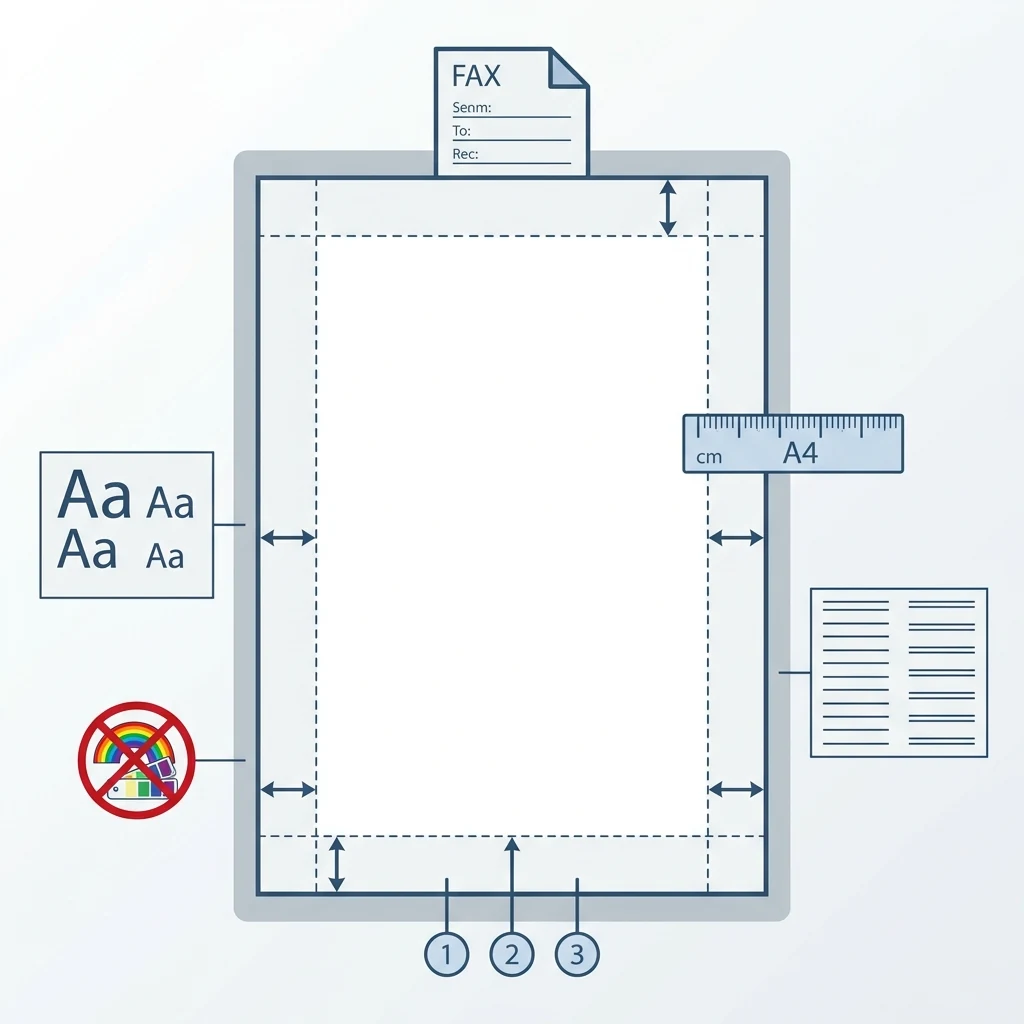
Following formatting standards ensures your fax will be legible regardless of the receiving machine or service.
Paper size
Standard paper size varies by region: US Letter (8.5 × 11 inches) in the United States and Canada, A4 (210 × 297 mm) in Europe and most other countries.
Recommended margins
Maintain minimum margins of 0.75 inches (or 20 mm) on all sides to prevent text cutoff during transmission or printing.
Font type and size
Use sans-serif fonts (Arial, Helvetica) or classic serif fonts (Times New Roman) at 11 or 12 points minimum to ensure readability after transmission.
Line spacing
Single spacing or 1.15 keeps documents compact. Avoid double spacing which unnecessarily increases page count.
Black and white only
Fax machines transmit in black and white. Avoid colors, gradients, and complex images that may become illegible.
Fax Cover Sheet Format
A cover sheet (cover page) facilitates identification and routing, especially in large organizations.
Why include a cover sheet
It allows quick identification of sender and recipient, indicates total page count (to verify nothing is missing), and provides space for messages or special instructions.
Required fields
- Sender: name, company, fax number
- Recipient: name, company, fax number
- Date of transmission
- Total number of pages (including cover)
- Subject or document reference
Optional fields
- Message or specific instructions
- Confidentiality notice (recommended for sensitive documents)
Use our fax cover page generator to quickly create a professional cover sheet.
Access generator →Headers, Footers & Page Numbering
Using headers
Include a minimal header with your company name or document title only when necessary. Avoid bulky logos or images that slow transmission.
Page numbering
Number all pages (e.g., Page 1 of 5, Page 2 of 5, etc.) to help recipients verify they received the complete document.
Professional footers
Footers may contain your contact details (phone, email) in small print. Keep it minimal to avoid cluttering the document.
Common Formatting Mistakes
Certain frequent errors can compromise your fax quality or readability.
Using colors or images
Faxes only support black and white. Colors and complex images produce illegible results.
Font size too small
Fonts smaller than 10 points become difficult to read after fax transmission.
Missing page count
Without indicating total pages, recipients cannot verify they received everything.
No cover sheet
In shared professional environments, missing cover sheets make internal routing difficult.
Insufficient margins
Narrow margins can cause text to be cut off at the edges during printing.
US / International Format Differences
Paper format
US Letter (United States, Canada) vs A4 (Europe, most other countries). Verify expected format when sending internationally.
Date format
US: MM/DD/YYYY (e.g., 12/16/2025). International: DD/MM/YYYY (e.g., 16/12/2025) or YYYY-MM-DD.
Language and conventions
Adapt document and cover sheet language according to the recipient.
Confidentiality notices
In the US, confidentiality notices are very common and detailed, often longer than in other countries.
Pre-Send Checklist
Review these points before sending your fax to ensure professional results.
Frequently Asked Questions
Can I send a fax in PDF format?
Yes, most online fax services accept PDFs and automatically convert them for transmission. Ensure your PDF follows formatting standards (black and white, proper margins).
Does fax support color?
No, traditional fax machines and most fax services transmit only in black and white. Colors are automatically converted to grayscale.
What's the best font for faxing?
Arial, Helvetica, or Times New Roman at 11-12 points are safe choices. Avoid fancy, handwritten, or thin fonts.
Is a cover sheet mandatory?
It's not technically mandatory, but highly recommended in professional contexts to clearly identify sender, recipient, and fax content.
What's the maximum number of pages I can fax?
There's no strict limit, but as a courtesy and to avoid transmission issues, limit faxes to 20-30 pages maximum. For larger documents, consider email or secure file sharing.
Should I adapt my format when faxing to the US?
If possible, use US Letter format (8.5 × 11 inches) for American recipients to avoid cut-off margins. Also adapt the date format (MM/DD/YYYY) on the cover sheet.
Related Guides
Continue reading with our comprehensive online fax guides: