Step-by-Step GuideApril 2026
How to Send a Fax from Gmail
Gmail doesn't have a built-in fax button, but with the right service, you can send a fax directly from your inbox in under two minutes. No machine, no phone line, no new software. Here's exactly how to do it.
Fastest Method
Sign up for Fax.Plus (free: 10 pages/month), register your Gmail address, then send an email to [email protected] with your document attached. Total time: about 90 seconds.
Can You Fax Directly from Gmail?
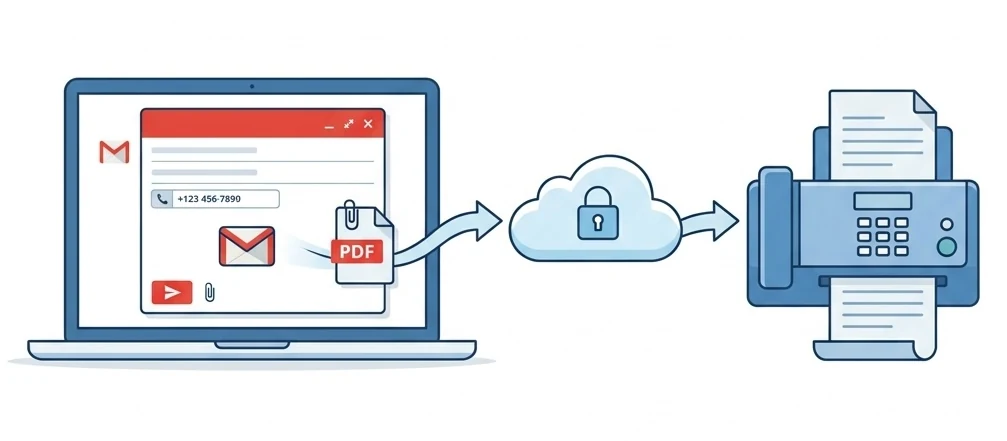
Not natively: Google hasn't added fax functionality to Gmail. But third-party services bridge the gap seamlessly. The most common approach is email-to-fax: you compose a regular Gmail message, type the fax number in a special format in the "To" field, attach your document, and hit send. The service handles the rest.
There are three ways to fax from Gmail, each with different trade-offs. We tested all of them with real faxes in April 2026.
Method 1Recommended
Email-to-Fax
This is the fastest and most natural way to fax from Gmail. You use your regular Gmail compose window: no add-ons, no extra apps. The only requirement is an account with a fax service that supports email-to-fax.
Sign up with a fax provider
Create a free account with Fax.Plus (10 pages/month free) or any provider that supports email-to-fax. Register the Gmail address you'll send from. This is required for security.
Open Gmail and compose a new email
Click the "Compose" button in Gmail (works on desktop or mobile). In the "To" field, type the fax number followed by your provider's domain. For example: [email protected]
Attach your document
Click the paperclip icon and attach your file: PDF, Word (.docx), image (JPG/PNG), or even a Google Docs link. Most providers accept files up to 10–20 MB. The subject line becomes your fax cover page text.
Hit Send, and you're done
Click Send. The fax provider receives your email, converts the attachment to a fax signal, and transmits it. You'll get a delivery confirmation email back in your Gmail inbox, usually within 1–3 minutes.
Email-to-Fax Address Formats by Provider
| Provider | Format | Example |
|---|---|---|
| Fax.Plus | [email protected] | [email protected] |
| eFax | [email protected] | [email protected] |
| MyFax | [email protected] | [email protected] |
| SRFax | [email protected] | [email protected] |
| CocoFax | Via web dashboard | Compose in Gmail → forward to CocoFax |
For a full comparison of email-to-fax providers, see our best email fax services guide.
Video Tutorial: Email-to-Fax with Fax.Plus
Demo: Email-to-Fax with Fax.Plus in under 2 minutes
Method 2
Google Workspace Add-On
If you use Google Workspace (formerly G Suite), some fax providers offer add-ons that integrate directly into your Gmail sidebar. This gives you a fax panel inside Gmail without switching tabs.
How to Install
- 1.Open Gmail → click the "+" icon in the right sidebar
- 2.Search "Fax.Plus" or "CocoFax" in the Marketplace
- 3.Click Install → Grant permissions
- 4.The fax panel appears in your Gmail sidebar
Benefits
- Fax directly from Gmail, no tab switching
- Send attachments from Google Drive
- Fax status visible in the sidebar
- Works with Google Docs, Sheets, and Slides
Limitation
Google Workspace add-ons are only available for Google Workspace accounts (paid business plans). If you use a free @gmail.com account, use Method 1 (email-to-fax) instead; it works identically.
Method 3
Web-Based Fax Service
If you'd rather not deal with email formatting, every fax provider also has a web dashboard where you can upload your document and send the fax through a standard form. You can use Gmail to receive confirmations and incoming faxes, but the sending happens through the provider's website.
FaxZero: 100% Free, No Account
Send 5 faxes/day (3 pages each) to USA/Canada. No Gmail integration, just a web form. But you genuinely can't beat free for a one-time fax.
Fax.Plus: Free Plan + Gmail Integration
10 pages/month free. Supports email-to-fax, Google Workspace add-on, and a web dashboard. The most Gmail-friendly option overall.
CocoFax: Cheapest Paid, HIPAA on Request
$4.99/mo with Google Workspace add-on. Includes HIPAA + GDPR + PHIPA compliance, the cheapest compliant option for healthcare teams using Gmail.
Best Fax Services for Gmail Users: Compared
We tested which services integrate best with Gmail. Here's the breakdown:
| Service | Email-to-Fax | Gmail Add-on | Free Plan | Price | HIPAA |
|---|---|---|---|---|---|
| Fax.Plus | ✓ | ✓ | 10 pg/mo | $6.99/mo | Business+ |
| CocoFax | ✓ | ✓ | 10 pg trial | $4.99/mo | ✓ All |
| eFax | ✓ | — | $5 trial | $18.99/mo | $50/mo |
| Dropbox Fax | ✓ | — | 5 pg + 20 ref | $9.99/mo | Trust Center BAA |
| FaxZero | — | — | 100% free | Free | — |
For the full comparison with all 10 services, see our 2026 fax service rankings.
How to Receive Faxes in Gmail
Receiving faxes in Gmail is even easier than sending them. When you sign up with a fax service, you get a dedicated fax number. When someone sends a fax to that number, the service converts it to a PDF and delivers it to your Gmail inbox as an attachment.
Pro tip: Create a Gmail label called "Faxes" and set up a filter to automatically tag emails from your fax provider. This keeps your inbox organized and makes fax history easy to search.
Pros & Cons of Faxing from Gmail
Advantages
- Zero learning curve: you already know how to use Gmail
- No extra software: works from your existing inbox
- Automatic archive: sent faxes live in your Gmail history
- Works on any device: desktop, phone, tablet
- Free options available: Fax.Plus offers 10 pages/month for free
- HIPAA options: CocoFax advertises compliance from $4.99/mo, with the BAA on request
Limitations
- Requires a third-party service: Gmail can't fax natively
- Monthly page limits: free tiers are capped
- Receiving needs a paid plan: free plans are send-only
- Format restrictions: some file types may not convert well
- Address format varies: each provider uses a different domain
Fax.Plus: Built for Gmail
Email-to-fax from Gmail, Google Workspace add-on, Google Drive integration. 10 free pages/month, 190+ countries. The most Gmail-native fax experience available.
Frequently Asked Questions
Is there a built-in fax feature in Gmail?
No. Gmail does not have native fax functionality. Google has never added this feature. To fax from Gmail, you need a third-party service like Fax.Plus, eFax, or CocoFax that provides an email-to-fax gateway.
Can I send a fax from Gmail for free?
Yes. Fax.Plus offers 10 free pages per month: just register your Gmail address and send to [email protected]. For US/Canada only, FaxZero is 100% free (3 pages, web form only). See our free fax guide for more options.
What file formats can I attach when faxing from Gmail?
Most services accept PDF, Word (.doc/.docx), Excel (.xls/.xlsx), image files (JPG, PNG, TIFF), and plain text. PDF is the safest choice. It preserves formatting exactly. Check our fax format guide for detailed specs.
Is faxing from Gmail HIPAA compliant?
It can be, but only if your fax provider offers encryption and a signed BAA (Business Associate Agreement). CocoFax advertises HIPAA on all plans from $4.99/mo, but that claim is self-attested and its BAA is only provided on request. Fax.Plus offers a signed BAA only on its Enterprise plan ($79.99/mo annual). Regular Gmail email is not HIPAA compliant on its own.
How do I know if my fax was delivered?
Every fax provider sends a delivery confirmation email to your Gmail inbox after the fax is transmitted. If the fax fails (busy line, wrong number, disconnected), you'll get a failure notification with the reason. Most providers also show status in their web dashboard.
Can I receive faxes in Gmail?
Yes. When you subscribe to a fax service, you get a dedicated fax number. Any fax sent to that number is converted to PDF and delivered to your Gmail as an attachment. You can read, forward, or archive it like any other email.
Does this work with a free @gmail.com account?
Yes. Email-to-fax (Method 1) works with any Gmail account, free or paid. Google Workspace add-ons (Method 2) require a paid Google Workspace subscription. For most users, Method 1 is sufficient.