Practical GuideApril 2026
How to Send a Fax from Outlook
Outlook doesn't have a built-in fax feature, but with the right service, you can send a fax directly from your Microsoft inbox in under two minutes. No machine, no phone line, no extra software. Works with Outlook 365, classic Outlook, and Outlook Web.
Can You Fax Directly from Outlook?
Not natively. Microsoft removed the fax function from Outlook years ago. But third-party services fill the gap seamlessly. The simplest method: email-to-fax. Compose a regular email in Outlook, type the fax number in a special format in the "To" field, attach your document, and hit Send. The service converts your email into a fax and transmits it.
We tested all three methods with real faxes in April 2026. Here's what works best with Outlook.
Fastest method
Create a free account at Fax.Plus (10 free pages/month), register your Outlook address, then send an email to [email protected] with your document attached. Total time: about 90 seconds.
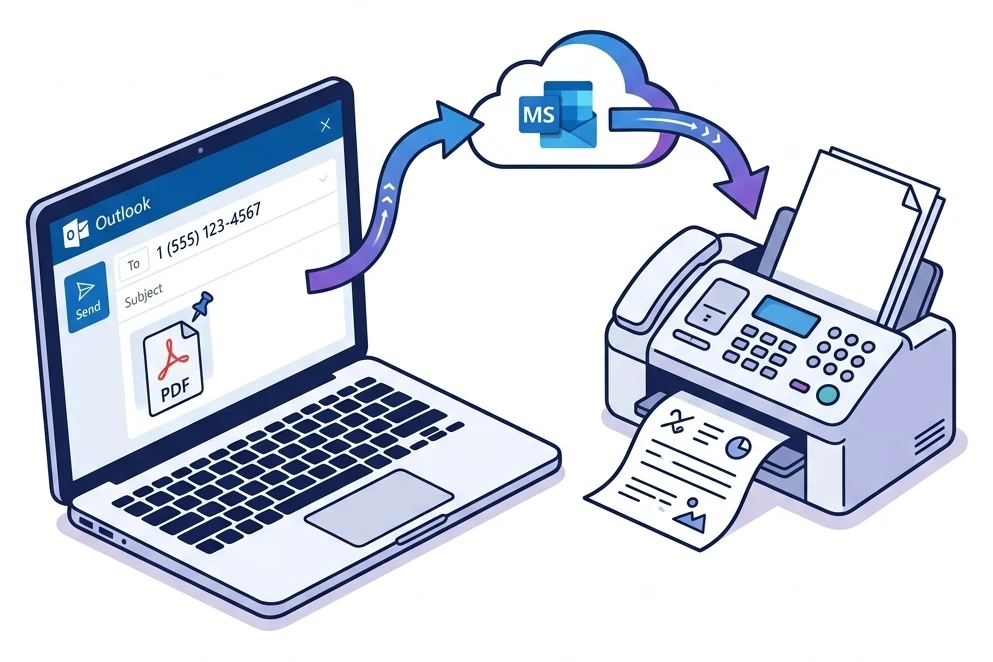
Method 1: Email-to-Fax from Outlook (Recommended)
The simplest and most natural way to send a fax from Outlook. Use your regular compose window: no add-in, no extra app. Works with Outlook 365, classic Outlook (Windows/Mac), Outlook Web (outlook.com), and even the Outlook mobile app.
Sign up with a fax provider
Create a free account at Fax.Plus (10 free pages/month) or any email-to-fax compatible provider. Register the Outlook address you'll send faxes from. This is a required security step.
Open Outlook and compose a new email
Click "New Email" in Outlook. Works on desktop, web, and mobile. In the "To" field, type the fax number followed by your provider's domain. For example: [email protected]
Attach your document
Click the paperclip and add your file: PDF, Word (.docx), Excel (.xlsx), or images (JPG/PNG). You can also attach directly from OneDrive or SharePoint. The email subject becomes the fax cover page text.
Hit Send, and you're done
Click Send. The provider receives your email, converts the attachment, and transmits the fax. You'll receive a delivery confirmation in your Outlook inbox, usually within 1–3 minutes.
Email-to-fax addresses by provider
| Provider | Format | Example |
|---|---|---|
| Fax.Plus | [email protected] | [email protected] |
| eFax | [email protected] | [email protected] |
| MyFax | [email protected] | [email protected] |
| CocoFax | Via web dashboard | Compose in Outlook → forward to CocoFax |
For a full comparison of email-to-fax services, see our best email fax services guide.
Method 2: Outlook Add-in
Microsoft allows you to install add-ins directly in Outlook. Some fax providers offer add-ins that add a "Send Fax" button to the interface. You get a fax panel without ever leaving your inbox.
How to install
- Open Outlook → click "Get Add-ins" in the ribbon
- Search for "Fax.Plus" or "eFax" in the Store
- Click Install → Grant permissions
- The fax button appears in your Outlook toolbar
Benefits
- Fax directly from Outlook, no tab switching
- Send files from OneDrive and SharePoint
- Fax status visible in the sidebar
- Compatible with Outlook 365 Desktop, Web, and Mobile
Note
Outlook add-ins are available for Microsoft 365 (formerly Office 365) and Outlook Web. Classic Outlook for Windows (without a 365 subscription) has limited add-in support. If your version doesn't support them, use Method 1 (email-to-fax). The result is identical.
Method 3: Online Fax Service
If you'd rather avoid email formatting, every fax provider also has a web dashboard where you can upload your document and send the fax via a standard form. Outlook then serves to receive confirmations and incoming faxes.
FaxZero: 100% free, no sign-up
5 faxes/day (3 pages each) to the US and Canada. No Outlook integration, just a web form. But it's free and unbeatable for a one-off fax.
Fax.Plus: Free + Outlook integration
10 free pages/month. Compatible with email-to-fax, Outlook 365 add-in, and web dashboard. The most complete option for Microsoft users.
CocoFax: Cheapest with HIPAA compliance
$4.99/mo with Microsoft integration. HIPAA, GDPR and PHIPA advertised (self-attested, BAA on request): the cheapest way in, best kept to non-PHI work.
Best Fax Services for Outlook: Comparison
We tested which services integrate best with Outlook and Microsoft 365. Here's the breakdown:
| Service | Email-to-Fax | Outlook Add-in | Free Plan | Price | HIPAA |
|---|---|---|---|---|---|
| Fax.Plus | ✓ | ✓ | 10 pg/mo | $6.99/mo | ✓ |
| CocoFax | ✓ | ✓ | 10 pg trial | $4.99/mo | ✓ |
| eFax | ✓ | ✓ | $5 1st mo | $18.99/mo | — |
| FaxZero | ✕ | ✕ | 100% free | Free | ✕ |
For the full comparison with all 10 services, see our 2026 online fax service rankings.
Outlook vs Gmail for Fax: What's the Difference?
Both email clients work with email-to-fax; the method is identical. But Outlook offers some specific advantages for professionals:
Outlook Advantages
- OneDrive/SharePoint: attach directly from Microsoft cloud storage
- Outlook Rules: auto-sort fax confirmations into dedicated folders
- Microsoft 365 Admin: centralized fax account management for enterprise
- Exchange/ActiveSync: instant sync of delivery receipts
Common Ground
- Email-to-fax works the same way
- Same providers (Fax.Plus, eFax, CocoFax)
- Same pricing and free plans
- Email delivery confirmations in both cases
Also use Gmail? Check our fax from Gmail guide.
How to Receive Faxes in Outlook
Receiving faxes in Outlook is even simpler than sending. Sign up with a fax provider and you'll get a dedicated fax number. When someone sends a fax to that number, the service converts it to PDF and delivers it to your Outlook inbox as an attachment.
Get a number
Choose a local or toll-free fax number. Available in 40+ countries including the US, UK, and Canada.
Fax → Outlook
Incoming faxes arrive as PDF attachments in your inbox. Searchable, archivable, safe.
Multi-device
Since it's Outlook, your faxes are accessible on PC, Mac, phone, tablet, and via the Web.
Tip: Create an Outlook rule to automatically move emails from your fax provider into a "Fax" folder. Your inbox stays clean and your fax history stays easy to find.
Pros and Cons of Faxing from Outlook
Pros
- Full Microsoft integration: OneDrive, SharePoint, Teams
- No extra software: everything happens in your inbox
- Automatic archiving: sent faxes stay in Outlook history
- Sorting rules: auto-file confirmations and received faxes
- Free options: Fax.Plus offers 10 free pages/month
- HIPAA/GDPR compliant: Fax.Plus (Switzerland), CocoFax (GDPR)
Cons
- Third-party required: Outlook doesn't fax natively
- Monthly page limits: free plans are capped
- Receiving costs extra: free plans are send-only
- Limited add-ins: classic Outlook (no 365) supports fewer add-ins
- Variable addresses: each provider uses a different domain
Fax.Plus: Perfect for Microsoft 365
Email-to-fax from Outlook, Microsoft 365 add-in, OneDrive integration. 10 free pages/month to 190+ countries. The smoothest experience for Outlook users.
Frequently Asked Questions
Does Outlook have a built-in fax feature?
No. Outlook has had no native fax functionality since the removal of legacy fax/modem connectors. Microsoft has no plans to reintroduce this function. To fax from Outlook, you need a third-party service like Fax.Plus or CocoFax that provides an email-to-fax gateway.
Can I send a fax from Outlook for free?
Yes. Fax.Plus offers 10 free pages per month. Register your Outlook address and send to [email protected]. For US/Canada only, FaxZero is 100% free (3 pages). See our free fax guide for more options.
Does Outlook Web (outlook.com) work?
Yes. Email-to-fax works with all versions of Outlook: Outlook 365 Desktop, classic Outlook, Outlook Web (outlook.com/live.com), and the Outlook mobile app. The process is identical: compose, attach, send.
Is faxing from Outlook HIPAA compliant?
It depends on the provider. Fax.Plus is based in Switzerland (one of the strictest data privacy jurisdictions) and ISO 27001 certified. CocoFax advertises HIPAA, GDPR and PHIPA from $4.99/mo, but those claims are self-attested and its BAA is only provided on request. Outlook alone is not sufficient for sensitive data.
Can I use email-to-fax with a Hotmail/Live account?
Yes. Hotmail, Live.com, and Outlook.com are all managed by Microsoft and work exactly like Outlook 365 for email-to-fax. Simply register your @hotmail.com or @live.com address with your fax provider.